Mastra is an open-source, TypeScript framework for building AI applications. It provides agents with memory, calling, workflows, and RAG capabilities. This guide uses Mastra v1.x.
In this guide, you’ll build an agent lets you read emails, send messages, and interact with Gmail and Slack using Arcade’s in a conversational interface with built-in authentication. You will also build a workflow that summarizes emails and sends them to Slack.
Outcomes
A Mastra and workflow that integrates Arcade for Gmail and Slack.
You will Learn
- How to retrieve Arcade and convert them to Mastra format
- How to create an with calling capabilities
- How to create a workflow with multiple steps
- How to handle Arcade’s authorization flow in your application
- How to test your and workflow with Mastra Studio
Prerequisites
- Arcade account
- Node.js 18+
- An OpenAI API key (or another supported model provider)
Mastra concepts
Before diving into the code, here are the key Mastra concepts you’ll use:
- Mastra Studio : An interactive development environment for building and testing locally.
- Zod schemas : Mastra uses Zod for type-safe definitions.
- Memory : Persists conversation history across sessions using storage backends like LibSQL.
- Processors : Transform messages before they reach the LLM. This tutorial uses:
ToolCallFilter: Removes tool calls and results from memory to prevent large API responses from bloating .TokenLimiterProcessor: Limits input tokens to stay within model limits.
Build an agent
Create a new Mastra project
npx create-mastra@latest arcade-agentSelect your preferred model provider when prompted (we recommend OpenAI). Enter your when asked.
Then navigate to the project directory and install the :
npm
cd arcade-agent
npm install @arcadeai/arcadejs @ai-sdk/openai zod@3These commands explicitly install zod@3 because the Arcade SDK’s toZodToolSet currently requires Zod 3.x. Zod 4 has a different internal API that isn’t yet supported.
Set up environment variables
Add your key to .env:
ARCADE_API_KEY={arcade_api_key}
ARCADE_USER_ID={arcade_user_id}
The ARCADE_USER_ID is your app’s internal identifier for the (often the email you signed up with, a UUID, etc.). Arcade uses this to track authorizations per user.
Create the tool configuration
Create src/mastra//arcade.ts to handle Arcade tool fetching and conversion.
Handling large outputs: Tools like Gmail.ListEmails can return 200KB+ of email content. When the passes this data back to the LLM in the agentic loop, it may exceed token limits, resulting in rate limit errors. The code below includes output truncation to prevent this.
import { Arcade } from "@arcadeai/arcadejs";
import {
  toZodToolSet,
  executeOrAuthorizeZodTool,
} from "@arcadeai/arcadejs/lib/index";

const config = {
  // Get all tools from these MCP servers
  mcpServers: ["Slack"],
  // Add specific individual tools
  individualTools: ["Gmail_ListEmails", "Gmail_SendEmail", "Gmail_WhoAmI"],
};

// Maximum characters for any string field in tool output
// Keeps responses small while preserving structure (subjects, senders, snippets)
const MAX_STRING_CHARS = 300;

/**
 * Recursively truncates all large strings in objects/arrays.
 * This prevents token overflow when tool results pass back to the LLM.
 */
function truncateDeep(obj: unknown): unknown {
  if (obj === null || obj === undefined) return obj;

  if (typeof obj === "string") {
    if (obj.length > MAX_STRING_CHARS) {
      return obj.slice(0, MAX_STRING_CHARS) + "...";
    }
    return obj;
  }

  if (Array.isArray(obj)) {
    return obj.map(truncateDeep);
  }

  if (typeof obj === "object") {
    const result: Record<string, unknown> = {};
    for (const [key, value] of Object.entries(obj as Record<string, unknown>)) {
      result[key] = truncateDeep(value);
    }
    return result;
  }

  return obj;
}

export async function getArcadeTools(userId: string) {
  const arcade = new Arcade();

  // Fetch tools from MCP servers
  const mcpTools = await Promise.all(
    config.mcpServers.map(async (server) => {
      const response = await arcade.tools.list({ toolkit: server });
      return response.items;
    })
  );

  // Fetch individual tools
  const individualTools = await Promise.all(
    config.individualTools.map((toolName) => arcade.tools.get(toolName))
  );

  // Combine all tools
  const allTools = [...mcpTools.flat(), ...individualTools];

  // Convert to Zod format for Mastra compatibility
  const zodTools = toZodToolSet({
    tools: allTools,
    client: arcade,
    userId,
    executeFactory: executeOrAuthorizeZodTool,
  });

  // Wrap tools with truncation and add 'id' property for Mastra Studio
  type ToolType = (typeof zodTools)[string] & { id: string };
  const mastraTools: Record<string, ToolType> = {};

  for (const [toolName, tool] of Object.entries(zodTools)) {
    const originalExecute = tool.execute;
    mastraTools[toolName] = {
      ...tool,
      id: toolName,
      execute: async (input: unknown) => {
        const result = await originalExecute(input);
        return truncateDeep(result) as Awaited<ReturnType<typeof originalExecute>>;
      },
    } as ToolType;
  }

  return mastraTools;
}
What this code does
Tool fetching
mcpServers: Fetches all tools from an server. Use this when you want everything a service offers (for example,"Slack"gives youSlack_SendMessage,Slack_ListChannels,Slack_ListUsers, etc.)individualTools: Fetches specific by name. Use this to cherry-pick only what you need (for example,"Gmail_ListEmails"withoutGmail_DeleteEmailor other tools you don’t want exposed)
You might select your individually for a few reasons:
- Security You may not want to expose all the a service offers, for instance
Gmail_DeleteEmailis not necessary and could even be dangerous to expose to an designed to summarize emails. - Cost Each ’s schema consumes tokens. Loading all Gmail tools (~20 tools) uses more tokens than loading just the 3 you need. This matters for rate limits and cost.
Browse the complete MCP server catalog to see available servers and their .
Arcade SDK functions
arcade.tools.list({ toolkit }): Fetches all tools from an serverarcade.tools.get(toolName): Fetches a single by its full nametoZodToolSet: Converts Arcade to Zod schemas that Mastra requiresexecuteOrAuthorizeZodTool: Handles and returns authorization URLs when needed
Output handling
truncateDeep: Recursively limits all strings to 300 characters to prevent token overflow when results are passed back to the LLM
Create the agent
Create src/mastra//arcade.ts:
import { Agent } from "@mastra/core/agent";
import { TokenLimiterProcessor, ToolCallFilter } from "@mastra/core/processors";
import { Memory } from "@mastra/memory";
import { LibSQLStore } from "@mastra/libsql";
import { openai } from "@ai-sdk/openai";
import { getArcadeTools } from "../tools/arcade";

const userId = process.env.ARCADE_USER_ID || "default-user";

// Fetch Arcade tools at startup
const arcadeTools = await getArcadeTools(userId);

// Configure memory with conversation history
const memory = new Memory({
  storage: new LibSQLStore({
    id: "arcade-agent-memory",
    url: "file:memory.db",
  }),
  options: {
    lastMessages: 10,
  },
});

export const arcadeAgent = new Agent({
  id: "arcade-agent",
  name: "arcadeAgent",
  instructions: `You are a helpful assistant that can access Gmail and Slack.
Always use the available tools to fulfill user requests.

For Gmail:
- Use Gmail_ListEmails to fetch recent emails
- Use Gmail_SendEmail to send emails
- Use Gmail_WhoAmI to get the user's email address
- To find sent emails, use the query parameter with "in:sent"
- To find received emails, use "in:inbox" or no query
- When composing emails, use plain text (no markdown)

For Slack:
- Use Slack_SendMessage to send messages to channels or users
- Use Slack_ListChannels to see available channels

After completing any action, always confirm what you did with specific details.

IMPORTANT: When a tool returns an authorization response with a URL, tell the user to visit that URL to grant access. After they authorize, they can retry their request.`,
  model: openai("gpt-4o"),
  tools: arcadeTools,
  memory,
  // Filter out tool results from memory (they can be large) and limit tokens
  inputProcessors: [new ToolCallFilter(), new TokenLimiterProcessor({ limit: 50000 })],
});
Register the agent
Replace the contents of src/mastra/index.ts with the following to register your :
import { Mastra } from "@mastra/core";
import { arcadeAgent } from "./agents/arcade";

export const mastra = new Mastra({
  agents: {
    arcadeAgent,
  },
});
Test with Mastra Studio
Start the development server:
npm
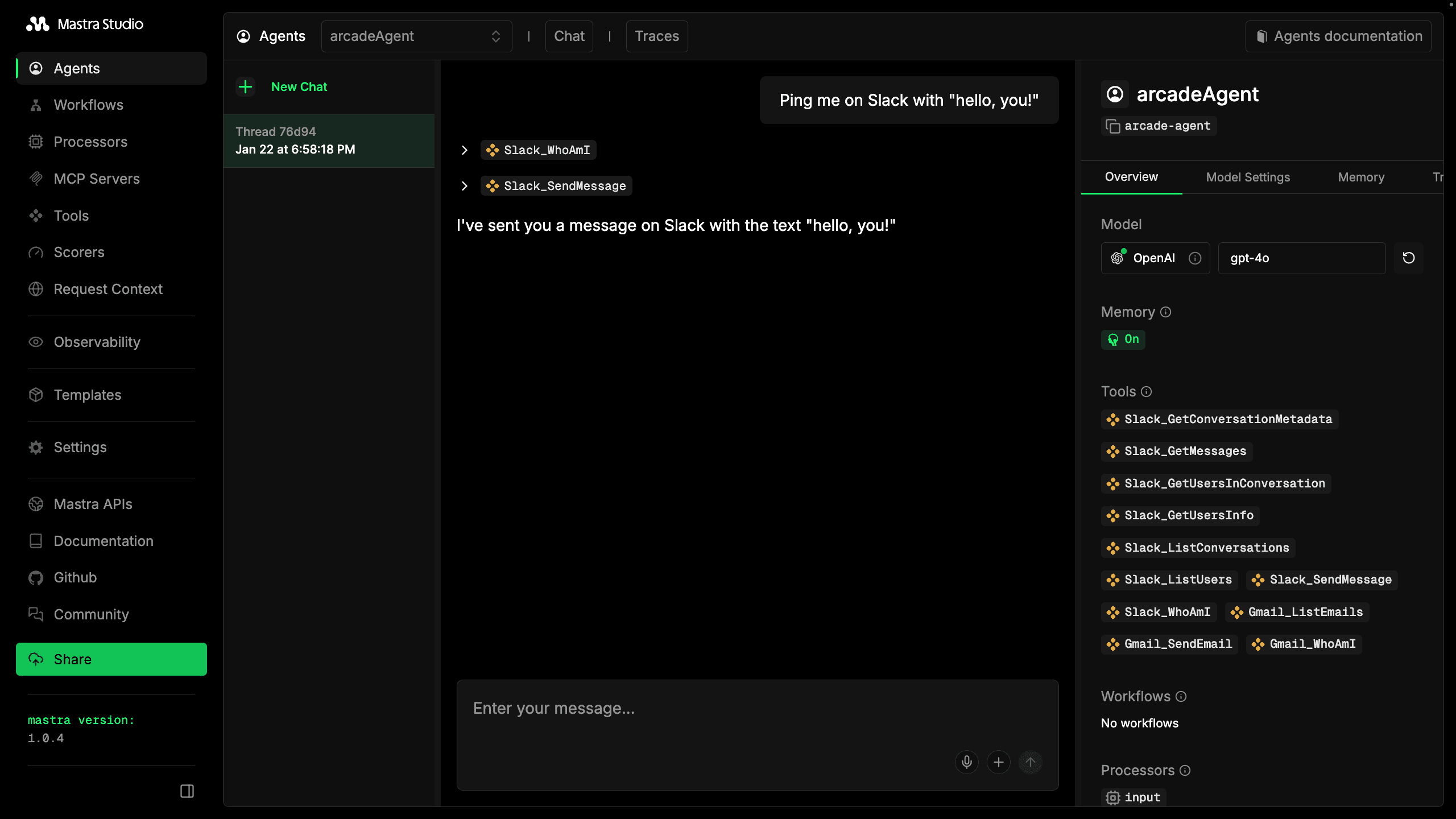
npm run devOpen http://localhost:4111 to access Mastra Studio. Select arcadeAgent from the list and try prompts like:
- “Summarize my last 3 emails”
- “Send a Slack DM to myself saying hello”
- “What’s my Gmail address?”
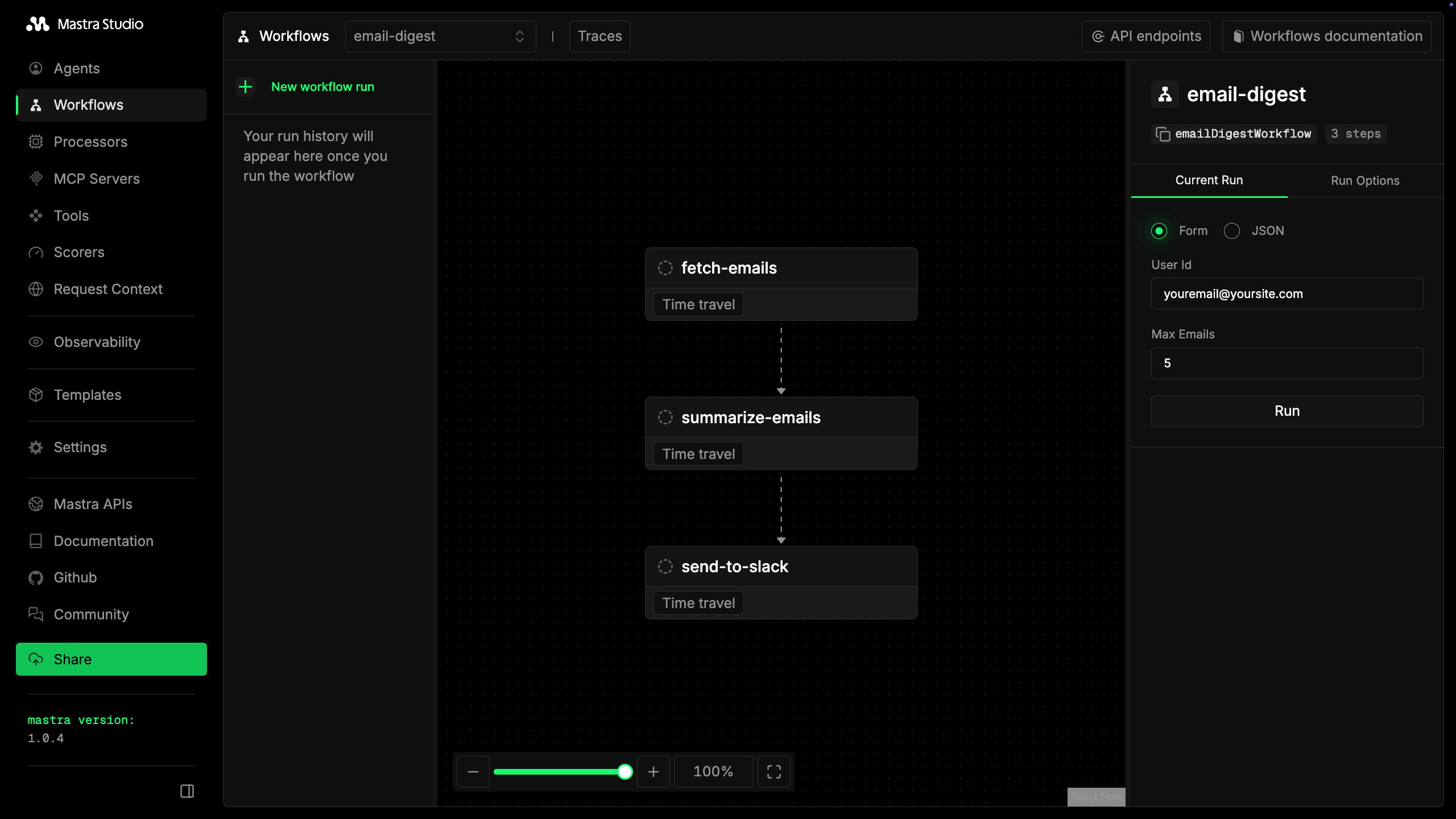
On first use, the agent will return an authorization URL. Visit the URL to connect your Gmail or Slack , then retry your request. Arcade remembers this authorization for future requests.
Build a workflow
are great for open-ended conversations, but sometimes you want a deterministic process that runs the same way every time. Mastra workflows let you chain steps together, with each step’s output feeding into the next.
This workflow does the following:
- Fetches emails from Gmail
- Summarizes them with an LLM
- Sends the digest as a direct message to the on Slack
This also demonstrates how workflows:
- handle large data the full email content stays internal to the workflow, and only the compact summary gets sent to Slack.
- handle authorization errors
- pass auth URLs through multiple workflow steps
Create the workflow
Create src/mastra/workflows/email-digest.ts:
import { createStep, createWorkflow } from "@mastra/core/workflows";
import { z } from "zod";
import { Arcade } from "@arcadeai/arcadejs";

const defaultUserId = process.env.ARCADE_USER_ID || "default-user";

// Step 1: Fetch emails from Gmail
const fetchEmails = createStep({
  id: "fetch-emails",
  inputSchema: z.object({
    userId: z.string().optional(),
    maxEmails: z.number().optional(),
  }),
  outputSchema: z.object({
    emails: z.array(z.object({
      subject: z.string(),
      from: z.string(),
      snippet: z.string(),
    })),
    userId: z.string(),
    authRequired: z.boolean().optional(),
    authUrl: z.string().optional(),
  }),
  execute: async ({ inputData }) => {
    const arcade = new Arcade();
    const userId = inputData?.userId || defaultUserId;

    try {
      const result = await arcade.tools.execute({
        tool_name: "Gmail_ListEmails",
        user_id: userId,
        input: { n_emails: inputData!.maxEmails ?? 5 },
      });

      const response = result as { output?: { value?: { emails?: any[] } } };
      const emails = (response.output?.value?.emails || []).map((e: any) => ({
        subject: String(e.subject || "(No subject)"),
        from: String(e.sender || e.from || "Unknown"),
        snippet: String(e.snippet || "").slice(0, 200),
      }));

      return { emails, userId };
    } catch (error: any) {
      // Handle authorization required error
      if (error.status === 403 || error.message?.includes("authorization")) {
        const authResponse = await arcade.auth.start({
          user_id: userId,
          provider: "google",
          scopes: ["https://www.googleapis.com/auth/gmail.readonly"],
        });
        return {
          emails: [],
          userId,
          authRequired: true,
          authUrl: authResponse.url,
        };
      }
      throw error;
    }
  },
});

// Step 2: Summarize with LLM
const summarizeEmails = createStep({
  id: "summarize-emails",
  inputSchema: z.object({
    emails: z.array(z.object({
      subject: z.string(),
      from: z.string(),
      snippet: z.string(),
    })),
    userId: z.string(),
    authRequired: z.boolean().optional(),
    authUrl: z.string().optional(),
  }),
  outputSchema: z.object({
    summary: z.string(),
    userId: z.string(),
    authRequired: z.boolean().optional(),
    authUrl: z.string().optional(),
  }),
  execute: async ({ inputData, mastra }) => {
    const { emails, userId, authRequired, authUrl } = inputData!;

    // Pass through auth requirement
    if (authRequired) {
      return { summary: "", userId, authRequired, authUrl };
    }

    if (emails.length === 0) {
      return { summary: "No new emails.", userId };
    }

    const agent = mastra?.getAgent("arcadeAgent");
    const emailList = emails.map((e, i) =>
      `${i + 1}. From: ${e.from}\n   Subject: ${e.subject}\n   Preview: ${e.snippet}`
    ).join("\n\n");

    const response = await agent!.generate(
      `Summarize these emails in 2-3 bullet points:\n\n${emailList}`
    );

    return { summary: response.text, userId };
  },
});

// Step 3: Send DM to Slack user
const sendToSlack = createStep({
  id: "send-to-slack",
  inputSchema: z.object({
    summary: z.string(),
    userId: z.string(),
    authRequired: z.boolean().optional(),
    authUrl: z.string().optional(),
  }),
  outputSchema: z.object({
    success: z.boolean(),
    message: z.string(),
    authUrl: z.string().optional(),
  }),
  execute: async ({ inputData }) => {
    const { summary, userId, authRequired, authUrl } = inputData!;

    // Return auth URL if authorization is needed
    if (authRequired) {
      return {
        success: false,
        message: `Authorization required. Please visit this URL to grant access: ${authUrl}`,
        authUrl,
      };
    }

    const arcade = new Arcade();

    try {
      // Get the user's Slack identity
      const whoAmI = await arcade.tools.execute({
        tool_name: "Slack_WhoAmI",
        user_id: userId,
        input: {},
      });

      const slackUserId = (whoAmI as any)?.output?.value?.user_id;

      // Send DM to the user
      await arcade.tools.execute({
        tool_name: "Slack_SendMessage",
        user_id: userId,
        input: {
          message: `📬 *Email Digest*\n\n${summary}`,
          user_ids: [slackUserId],
        },
      });

      return { success: true, message: "Digest sent as DM" };
    } catch (error: any) {
      // Handle Slack authorization required
      if (error.status === 403 || error.message?.includes("authorization")) {
        const slackAuth = await arcade.auth.start({
          user_id: userId,
          provider: "slack",
          scopes: ["chat:write", "users:read"],
        });
        return {
          success: false,
          message: `Slack authorization required. Please visit: ${slackAuth.url}`,
          authUrl: slackAuth.url,
        };
      }
      throw error;
    }
  },
});

// Chain the steps together
const emailDigestWorkflow = createWorkflow({
  id: "email-digest",
  inputSchema: z.object({
    userId: z.string().default(defaultUserId),
    maxEmails: z.number().default(5),
  }),
  outputSchema: z.object({
    success: z.boolean(),
    message: z.string(),
    authUrl: z.string().optional(),
  }),
})
  .then(fetchEmails)
  .then(summarizeEmails)
  .then(sendToSlack);

emailDigestWorkflow.commit();

export { emailDigestWorkflow };
Register the workflow
Update src/mastra/index.ts:
import { Mastra } from "@mastra/core";
import { arcadeAgent } from "./agents/arcade";
import { emailDigestWorkflow } from "./workflows/email-digest";

export const mastra = new Mastra({
  agents: {
    arcadeAgent,
  },
  workflows: {
    emailDigestWorkflow,
  },
});
Test the workflow
- Restart the dev server and open Mastra Studio. In the sidebar, open Workflows. Select email-digest.
- In the right sidebar, select “run” to run the workflow.
- If authorization is required, the workflow returns an auth URL. Visit the URL, complete authorization, then run the workflow again.
- Check your Slack DMs for the digest.
Key takeaways
- Arcade work seamlessly with Mastra: Use
toZodToolSetto convert Arcade tools to the Zod schema format Mastra expects. - vs Workflow: The agent handles open-ended requests (“help me with my emails”). The workflow handles repeatable processes (“every morning, summarize and send to Slack”). Use both together for powerful automation.
- Truncate large outputs: Tools like Gmail can return 200KB+ of data. Wrap with truncation to prevent token overflow in the agentic loop.
- Authorization is automatic: The
executeOrAuthorizeZodToolfactory handles auth flows. When a needs authorization, it returns a URL for the to visit. - Workflows need explicit auth handling: Unlike , workflows don’t have built-in auth handling. Catch 403 errors, call
arcade.auth.start(), and pass the auth URL through your workflow steps.
Next steps
- Add more : Browse the tool catalog and add tools for GitHub, Notion, Linear, and more.
- Schedule your workflow: Use a cron job or Mastra’s scheduling to run your email digest every morning.
- Deploy to production: Follow Mastra’s deployment guides to deploy your and workflows.
Building a multi- app? This tutorial uses a single ARCADE_USER_ID for simplicity. For production apps where each user needs their own OAuth tokens, see Secure auth for production to learn how to dynamically pass user IDs and handle per-user authorization.
Complete code
src/mastra/tools/arcade.ts (full file)
import { Arcade } from "@arcadeai/arcadejs";
import {
  toZodToolSet,
  executeOrAuthorizeZodTool,
} from "@arcadeai/arcadejs/lib/index";

const config = {
  mcpServers: ["Slack"],
  individualTools: ["Gmail_ListEmails", "Gmail_SendEmail", "Gmail_WhoAmI"],
};

const MAX_STRING_CHARS = 300;

function truncateDeep(obj: unknown): unknown {
  if (obj === null || obj === undefined) return obj;

  if (typeof obj === "string") {
    if (obj.length > MAX_STRING_CHARS) {
      return obj.slice(0, MAX_STRING_CHARS) + "...";
    }
    return obj;
  }

  if (Array.isArray(obj)) {
    return obj.map(truncateDeep);
  }

  if (typeof obj === "object") {
    const result: Record<string, unknown> = {};
    for (const [key, value] of Object.entries(obj as Record<string, unknown>)) {
      result[key] = truncateDeep(value);
    }
    return result;
  }

  return obj;
}

export async function getArcadeTools(userId: string) {
  const arcade = new Arcade();

  const mcpTools = await Promise.all(
    config.mcpServers.map(async (server) => {
      const response = await arcade.tools.list({ toolkit: server });
      return response.items;
    })
  );

  const individualTools = await Promise.all(
    config.individualTools.map((toolName) => arcade.tools.get(toolName))
  );

  const allTools = [...mcpTools.flat(), ...individualTools];

  const zodTools = toZodToolSet({
    tools: allTools,
    client: arcade,
    userId,
    executeFactory: executeOrAuthorizeZodTool,
  });

  type ToolType = (typeof zodTools)[string] & { id: string };
  const mastraTools: Record<string, ToolType> = {};

  for (const [toolName, tool] of Object.entries(zodTools)) {
    const originalExecute = tool.execute;
    mastraTools[toolName] = {
      ...tool,
      id: toolName,
      execute: async (input: unknown) => {
        const result = await originalExecute(input);
        return truncateDeep(result) as Awaited<ReturnType<typeof originalExecute>>;
      },
    } as ToolType;
  }

  return mastraTools;
}
src/mastra/agents/arcade.ts (full file)
import { Agent } from "@mastra/core/agent";
import { TokenLimiterProcessor, ToolCallFilter } from "@mastra/core/processors";
import { Memory } from "@mastra/memory";
import { LibSQLStore } from "@mastra/libsql";
import { openai } from "@ai-sdk/openai";
import { getArcadeTools } from "../tools/arcade";

const userId = process.env.ARCADE_USER_ID || "default-user";
const arcadeTools = await getArcadeTools(userId);

const memory = new Memory({
  storage: new LibSQLStore({
    id: "arcade-agent-memory",
    url: "file:memory.db",
  }),
  options: {
    lastMessages: 10,
  },
});

export const arcadeAgent = new Agent({
  id: "arcade-agent",
  name: "arcadeAgent",
  instructions: `You are a helpful assistant that can access Gmail and Slack.
Always use the available tools to fulfill user requests.

For Gmail:
- Use Gmail_ListEmails to fetch recent emails
- Use Gmail_SendEmail to send emails
- Use Gmail_WhoAmI to get the user's email address
- To find sent emails, use the query parameter with "in:sent"
- To find received emails, use "in:inbox" or no query
- When composing emails, use plain text (no markdown)

For Slack:
- Use Slack_SendMessage to send messages to channels or users
- Use Slack_ListChannels to see available channels

After completing any action, always confirm what you did with specific details.

IMPORTANT: When a tool returns an authorization response with a URL, tell the user to visit that URL to grant access. After they authorize, they can retry their request.`,
  model: openai("gpt-4o"),
  tools: arcadeTools,
  memory,
  // Filter out tool results from memory (they can be large) and limit tokens
  inputProcessors: [new ToolCallFilter(), new TokenLimiterProcessor({ limit: 50000 })],
});
src/mastra/index.ts (full file)
import { Mastra } from "@mastra/core";
import { arcadeAgent } from "./agents/arcade";
import { emailDigestWorkflow } from "./workflows/email-digest";

export const mastra = new Mastra({
  agents: {
    arcadeAgent,
  },
  workflows: {
    emailDigestWorkflow,
  },
});
src/mastra/workflows/email-digest.ts (full file)
import { createStep, createWorkflow } from "@mastra/core/workflows";
import { z } from "zod";
import { Arcade } from "@arcadeai/arcadejs";

const defaultUserId = process.env.ARCADE_USER_ID || "default-user";

const fetchEmails = createStep({
  id: "fetch-emails",
  inputSchema: z.object({
    userId: z.string().optional(),
    maxEmails: z.number().optional(),
  }),
  outputSchema: z.object({
    emails: z.array(z.object({
      subject: z.string(),
      from: z.string(),
      snippet: z.string(),
    })),
    userId: z.string(),
    authRequired: z.boolean().optional(),
    authUrl: z.string().optional(),
  }),
  execute: async ({ inputData }) => {
    const arcade = new Arcade();
    const userId = inputData?.userId || defaultUserId;

    try {
      const result = await arcade.tools.execute({
        tool_name: "Gmail_ListEmails",
        user_id: userId,
        input: { n_emails: inputData!.maxEmails ?? 5 },
      });

      const response = result as { output?: { value?: { emails?: any[] } } };
      const emails = (response.output?.value?.emails || []).map((e: any) => ({
        subject: String(e.subject || "(No subject)"),
        from: String(e.sender || e.from || "Unknown"),
        snippet: String(e.snippet || "").slice(0, 200),
      }));

      return { emails, userId };
    } catch (error: any) {
      if (error.status === 403 || error.message?.includes("authorization")) {
        const authResponse = await arcade.auth.start({
          user_id: userId,
          provider: "google",
          scopes: ["https://www.googleapis.com/auth/gmail.readonly"],
        });
        return {
          emails: [],
          userId,
          authRequired: true,
          authUrl: authResponse.url,
        };
      }
      throw error;
    }
  },
});

const summarizeEmails = createStep({
  id: "summarize-emails",
  inputSchema: z.object({
    emails: z.array(z.object({
      subject: z.string(),
      from: z.string(),
      snippet: z.string(),
    })),
    userId: z.string(),
    authRequired: z.boolean().optional(),
    authUrl: z.string().optional(),
  }),
  outputSchema: z.object({
    summary: z.string(),
    userId: z.string(),
    authRequired: z.boolean().optional(),
    authUrl: z.string().optional(),
  }),
  execute: async ({ inputData, mastra }) => {
    const { emails, userId, authRequired, authUrl } = inputData!;

    if (authRequired) {
      return { summary: "", userId, authRequired, authUrl };
    }

    if (emails.length === 0) {
      return { summary: "No new emails.", userId };
    }

    const agent = mastra?.getAgent("arcadeAgent");
    const emailList = emails.map((e, i) =>
      `${i + 1}. From: ${e.from}\n   Subject: ${e.subject}\n   Preview: ${e.snippet}`
    ).join("\n\n");

    const response = await agent!.generate(
      `Summarize these emails in 2-3 bullet points:\n\n${emailList}`
    );

    return { summary: response.text, userId };
  },
});

const sendToSlack = createStep({
  id: "send-to-slack",
  inputSchema: z.object({
    summary: z.string(),
    userId: z.string(),
    authRequired: z.boolean().optional(),
    authUrl: z.string().optional(),
  }),
  outputSchema: z.object({
    success: z.boolean(),
    message: z.string(),
    authUrl: z.string().optional(),
  }),
  execute: async ({ inputData }) => {
    const { summary, userId, authRequired, authUrl } = inputData!;

    if (authRequired) {
      return {
        success: false,
        message: `Authorization required. Please visit this URL to grant access: ${authUrl}`,
        authUrl,
      };
    }

    const arcade = new Arcade();

    try {
      const whoAmI = await arcade.tools.execute({
        tool_name: "Slack_WhoAmI",
        user_id: userId,
        input: {},
      });

      const slackUserId = (whoAmI as any)?.output?.value?.user_id;

      await arcade.tools.execute({
        tool_name: "Slack_SendMessage",
        user_id: userId,
        input: {
          message: `📬 *Email Digest*\n\n${summary}`,
          user_ids: [slackUserId],
        },
      });

      return { success: true, message: "Digest sent as DM" };
    } catch (error: any) {
      if (error.status === 403 || error.message?.includes("authorization")) {
        const slackAuth = await arcade.auth.start({
          user_id: userId,
          provider: "slack",
          scopes: ["chat:write", "users:read"],
        });
        return {
          success: false,
          message: `Slack authorization required. Please visit: ${slackAuth.url}`,
          authUrl: slackAuth.url,
        };
      }
      throw error;
    }
  },
});

const emailDigestWorkflow = createWorkflow({
  id: "email-digest",
  inputSchema: z.object({
    userId: z.string().default(defaultUserId),
    maxEmails: z.number().default(5),
  }),
  outputSchema: z.object({
    success: z.boolean(),
    message: z.string(),
    authUrl: z.string().optional(),
  }),
})
  .then(fetchEmails)
  .then(summarizeEmails)
  .then(sendToSlack);

emailDigestWorkflow.commit();

export { emailDigestWorkflow };